.png)
Published:
23/7/2026
Updated:
28/8/2026
Website Redesign: When You Need One and When You Don't
Short answer: You need a website redesign when your current site is actively costing you leads, sales, or credibility, not simply because it looks a few years old. The clearest signals are poor mobile performance, positioning that no longer matches what you sell, a content system nobody can update, and pages that Google and AI search engines struggle to parse. If none of those apply, a targeted refresh almost always beats a full rebuild.
In my projects with agencies and end clients, most "we need a redesign" requests turn out to be three or four fixable problems wearing one big scary label. Here is how I decide, in practice, whether a website redesign is justified or whether you are about to spend money you do not need to spend.
What counts as a website redesign, and what does not?
A redesign rebuilds the structure, layout, and often the underlying platform of your site. A refresh keeps the structure and updates the surface: colours, typography, imagery, and copy. That difference matters because the two carry very different cost and risk.
A refresh is measured in days and rarely touches your URLs, so your search rankings stay put. A full redesign is measured in weeks, changes your information architecture, and can put existing rankings at risk if redirects and on-page structure are not handled carefully. So the honest first question is never "does it look old?" but "is the structure holding me back?"
When do you actually need a website redesign?
From what I see across client work, a full redesign is the right call when at least one of these is clearly true:
- Your positioning has changed. New audience, new offer, or a pivot the current site cannot express without fighting the layout.
- The site is slow on mobile and you cannot fix it in place. Bloated templates, heavy third-party scripts, or a builder that will not let you clean up the markup.
- Nobody can update it. Simple content edits require a developer, so the site quietly goes stale.
- It cannot be found or quoted. Thin structure, missing headings, and no clean data for Google or AI engines to lift an answer from.
- It does not convert. Traffic arrives but the path to a lead or sale is confusing, buried, or broken.
Why does mobile performance push so many redesigns?
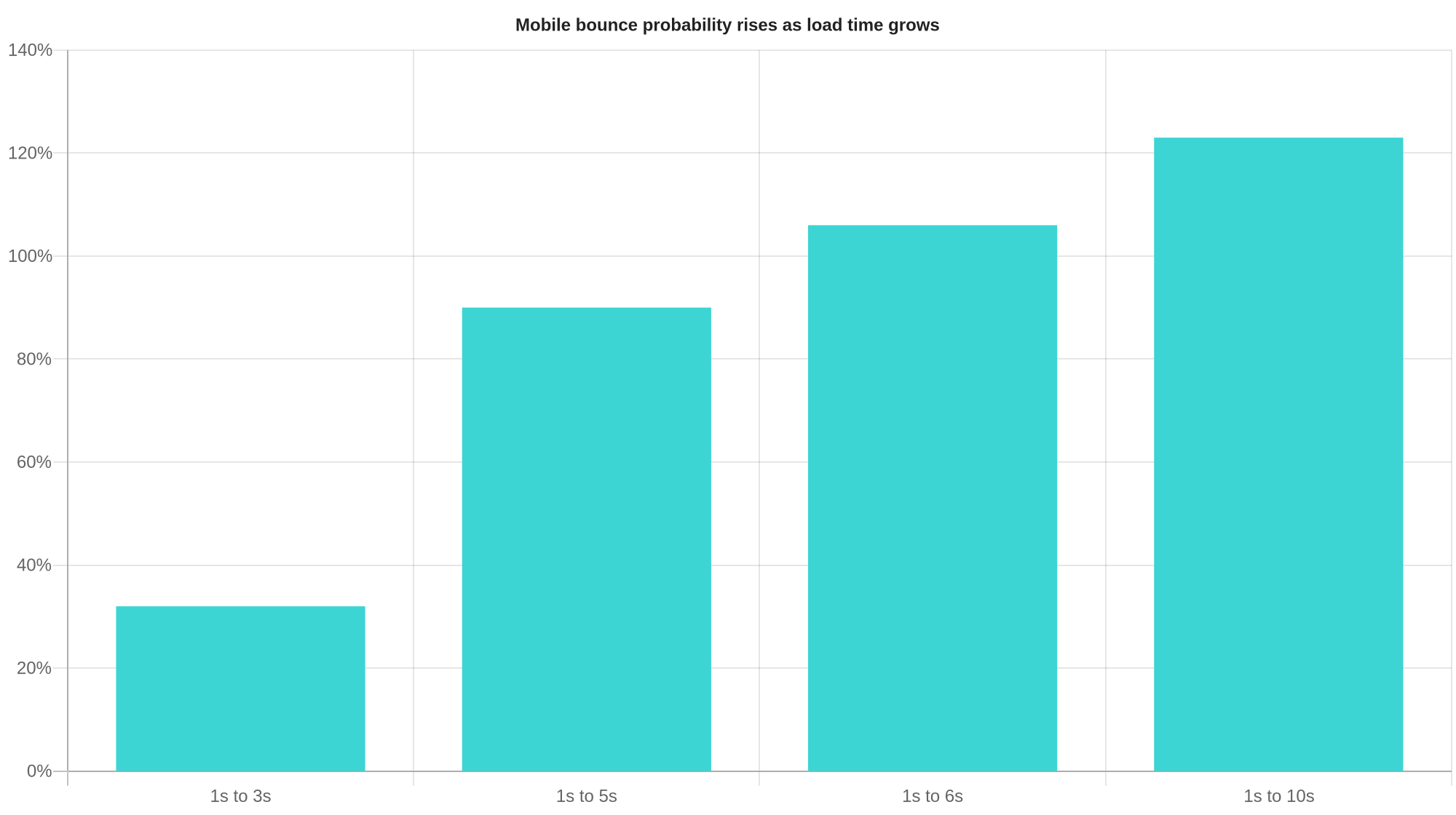
Speed is the signal I see undervalued most. Google and SOASTA analysed real mobile sessions and found that as page load time grows, the probability that a visitor bounces climbs sharply: up 32% as load goes from 1 second to 3 seconds, 90% from 1 to 5 seconds, and 123% from 1 to 10 seconds. You are not losing a ranking position; you are losing the visit before the page even settles.
Google's Core Web Vitals put concrete targets on this: a good page loads its main content (LCP) within 2.5 seconds, responds to interaction (INP) in 200 milliseconds or less, and holds layout stable (CLS) at 0.1 or less, measured at the 75th percentile of visits (web.dev). If your site misses these and the platform will not let you fix it, that is a genuine redesign trigger. If it misses them because of oversized images or one runaway script, that is a tune-up. I break down the in-place fixes in my guide on how to speed up a Webflow site.
When should you NOT redesign?
Skip the full rebuild when the structure is sound and only the surface feels tired. If your pages are fast, your CMS is editable, your rankings are healthy, and visitors convert, then a redesign mostly buys you a fresh coat of paint and a season of migration risk. In those cases I steer clients toward a refresh: update the hero, tighten the copy, modernise the type and imagery, and add the structured data that helps you get quoted. You keep your URLs, your rankings, and your budget.
Cost is the other reality check. Before you commit, it helps to know what each path realistically costs; I lay that out in how much a website costs so you can compare a refresh against a rebuild with real numbers rather than a gut feeling.
How do you redesign without losing your search rankings?
If you do rebuild, protect what already works. Map every existing URL to its new home and set 301 redirects before launch. Keep your strongest pages structurally similar so Google does not have to relearn them. Preserve headings, titles, and any FAQ or schema markup that currently earns visibility. Launch on a platform where non-developers can maintain content, so the new site does not decay the way the old one did. Done this way, a redesign compounds your existing authority instead of resetting it.
If you are weighing a redesign against a refresh and want a straight answer rather than a sales pitch, book a quick call and tell me what your current site is doing wrong. I will tell you which path actually fits, and roughly what it takes.
FAQ
How do I know if I need a website redesign?
You need a redesign when your site actively costs you leads, sales, or credibility: poor mobile performance you cannot fix in place, positioning that no longer matches your offer, a CMS nobody can update, or pages search engines cannot parse. If the structure is sound and only the surface feels dated, a refresh is usually the better choice.
What is the difference between a website redesign and a refresh?
A redesign rebuilds the structure, layout, and often the platform, while a refresh keeps the structure and updates colours, type, imagery, and copy. A refresh takes days and preserves your URLs and rankings; a redesign takes weeks and carries migration risk if redirects are not handled carefully.
How often should you redesign a website?
There is no fixed schedule. Redesign when the business or the site's performance demands it, not on a timer. Many sites run for years with periodic refreshes and never need a full rebuild.
Will a website redesign hurt my SEO?
It can if URLs change without redirects or if page structure is rebuilt from scratch. Protect rankings by mapping every URL to its new home with 301 redirects, keeping strong pages structurally similar, and preserving titles, headings, and schema markup.
How much does a website redesign cost?
It varies widely with scope, from a light refresh to a full multi-page rebuild with new CMS architecture. Compare the cost of a refresh against a full rebuild before committing, since a refresh often delivers most of the benefit for a fraction of the price.
Should I redesign or just improve my current site?
If your site is fast, editable, ranking, and converting, improve it rather than rebuild it. Reserve a full redesign for when the structure, platform, or positioning is genuinely holding you back.